Meshtastic on amateur radio spectrum
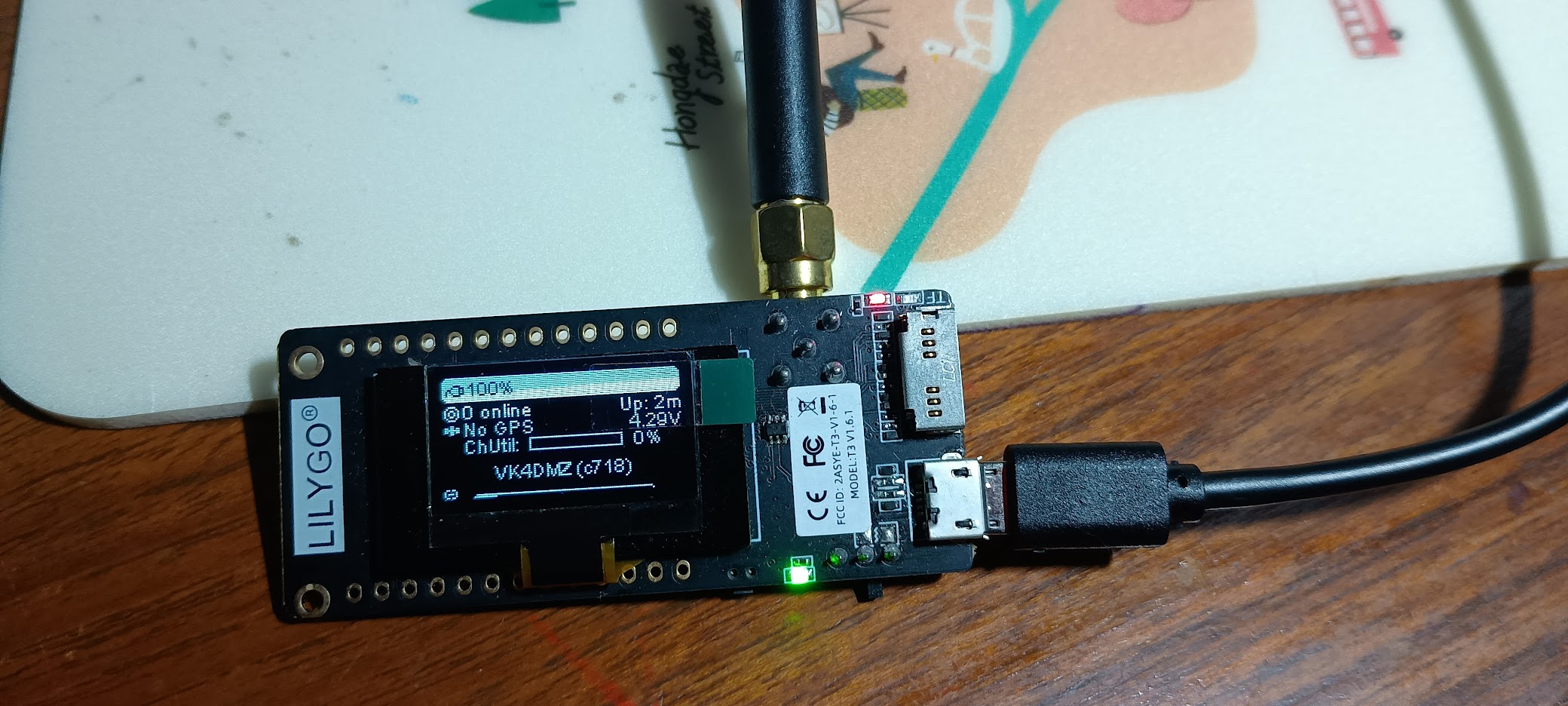
Meshtastic is a great fit for community and field work where you want a resilient mesh with no dependence on phone coverage. If you hold an amateur radio licence and have a 433 MHz TTGO LoRa board, you can run Meshtastic on the 70 cm band around 433 MHz and identify with your callsign.
Amateur radio is a licensed public service where individuals experiment, learn and communicate using radio equipment across a wide range of bands. In the US it is commonly called ham radio, while in Australia the more common term is amateur radio. A few of us at Refactor Red hold amateur licences and enjoy the hobby. It is a practical skill set that supports emergency communications, technical experimentation and community knowledge, and it is worth keeping alive for the future.
This guide focuses on the setup steps that matter for licensed operation on amateur frequencies, with a practical, repeatable configuration you can apply to every node in your mesh.
What you need
- A LilyGo SX1278 433 MHz board, or another 433 MHz TTGO-compatible LoRa board
- An appropriate 433 MHz antenna
- A USB cable and a computer to flash firmware
- The Meshtastic app for Android or iOS
Example board: LilyGo SX1278 433 MHz
Before you transmit
Only operate on amateur radio frequencies if you are licensed and your local rules allow the mode and power you intend to use. You are responsible for compliance, including identification requirements and any constraints on encryption.
Flash Meshtastic firmware
Install the Meshtastic firmware for your board using the official flasher or tool of choice. Once the device boots, confirm you can connect to it from the Meshtastic app.
Set radio basics for 433 MHz
In Australia, 433 MHz in the 70 cm band makes sense for amateur operation because there are not many ham allocations near 915 MHz. The lower frequency can also deliver longer range in the same terrain, which is useful for wide paddocks and rolling country.
In the app, choose the correct regional preset for 433 MHz so the device uses legal channels and limits for your location. Keep all nodes on the same region and channel plan to avoid fragmentation.
Frequency selection notes (Australia)
When selecting a simplex channel, use the WIA band plans as your starting point and avoid protected segments.
- Use calling frequencies only to make initial contact, then move off to a working frequency
- Avoid beacon segments so you do not mask weak signal activity
- Keep clear of satellite downlink segments
- Avoid repeater inputs and outputs for simplex work
For a 433 MHz TTGO running Meshtastic, the cleanest places in the plan are the Experimental segment from 432.600 to 433.000 MHz, or right on the lower edge of 433.025 MHz. The Experimental segment is not a calling frequency, beacon segment, or repeater input, and is intended for new or non-traditional digital use. It also sits below the LIPD band, which is typically noisy due to garage door openers, weather stations and cheap sensors.
In practice, many Australian Meshtastic users pick a centre frequency in the 432.900 to 432.950 MHz range and avoid placing it exactly on 432.600 or 433.000. Choose a centre frequency that matches your channel spacing and keeps you within the Experimental segment.
Configure your callsign and ham mode
Meshtastic supports a licensed user mode for amateur radio. When you enable it, your callsign should be used as the Long Name, and you should also remove channel encryption by clearing the PSK. The official user configuration guide outlines the required fields and behaviour.
From the app, go to Settings and update the User configuration:
- Long Name - set this to your callsign
- Short Name - a short identifier derived from your callsign
- Is Licensed - enable this if you are operating under your amateur licence
- Is Unmessageable - leave disabled unless the node is acting as a repeater or sensor role
If you use the CLI, these examples mirror the official guidance:
meshtastic --set-owner 'YOURCALLSIGN'
meshtastic --set-owner-short 'CALL'
meshtastic --set-ham 'YOURCALLSIGN'
When you enable ham mode, also clear the channel PSK so the mesh is not encrypted. This is a requirement for amateur operation in many jurisdictions and is called out in the user configuration documentation.
Why no encryption? Amateur spectrum is regulated to keep communications open and monitorable for compliance and interference management. The WIA band plans highlight that segments are shared and coordinated under a voluntary plan, and encrypted traffic runs counter to that shared, observable use of the band. That is why Meshtastic recommends clearing the PSK when operating under an amateur licence.
Test with a second node
Bring up a second 433 MHz node with the same region and channel settings, then send a direct message from the app. If the message does not arrive:
- Confirm both devices are on the same region and channel
- Check that the PSK is empty on both devices
- Verify Is Unmessageable is disabled on the node you are trying to contact
- Try a better antenna or more separation between nodes
Operational tips
- Keep your callsign visible and consistent across all nodes you operate
- Document your channel plan so everyone in your group can join the mesh without guesswork
- Start with a conservative transmit power and increase only if needed
Because you are operating under an amateur callsign, you are not bound by LIPD power limits, but be sensible. Meshtastic works best with moderate power and good antennas rather than cranking the TX level. If you want, tell me your state or city and I can suggest a specific channel that avoids any known local repeaters or hotspots near you.
MeshCore in brief
MeshCore is another LoRa mesh project that shares the same off-grid messaging goal as Meshtastic. It focuses on secure, reliable decentralised communications and supports a range of devices and apps. If you are comparing platforms, it is worth reviewing MeshCore alongside Meshtastic to see which approach to routing and device support best fits your deployment.
Reference
Video
Wrap-up
Meshtastic on 433 MHz is a practical way to build a resilient local mesh with amateur radio identification. Once your user settings and channel encryption are aligned with licence requirements, the rest of the experience is just like any other Meshtastic deployment - simple, robust and ready for the field.